
Your needs, this model
Does it fit your priorities?
Can I schedule an indoor appliance and use Apple Home with these two plugs?
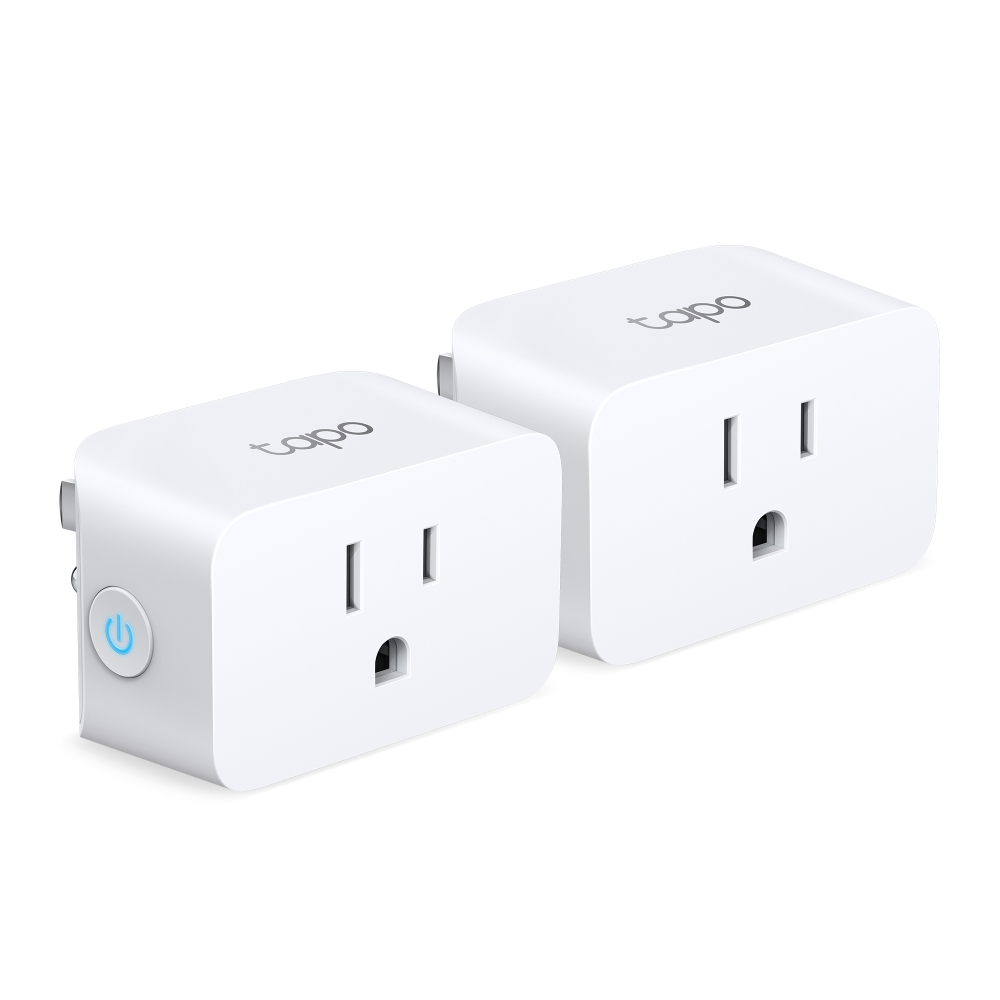
The selected TP15 V1 2-pack page lists two devices, while the TP15 feature sources document Tapo weekly schedules and Matter setup to Apple Home. Treat each unit as its own device; this is not a promise that one shared schedule or controller setup automatically covers both.
Explore this need in the finder →Will the two-pack support a motor at the stated limit?
Each TP15 has a 1/6 hp motor ceiling in the US quick-start guide. Do not multiply it by two, and do not infer motor suitability from the separate 15 A resistive maximum; check each appliance's nameplate and startup instructions.
Explore this need in the finder →Does the two-pack provide 30 A or 3,600 W for one appliance?
No. The official selected page shows two TP15 plugs, but the per-plug general/resistive limit remains 15 A / 1,800 W at 120 V. The two-unit package is quantity, not a combined rated outlet; use one device's limit for each connected appliance.
Explore this need in the finder →Assessment scope: This is a source-based assessment of TP-Link's US TP15 V1 two-pack route, not a product test. I have not handled the plugs, measured current, paired them at home or verified live retailer inventory. The US category lists a distinct two-pack item, and its selected page identifies TP15 V1 and package contents of two plugs. The second unit changes how many locations the bundle can cover; it does not change the rating or function of either plug.
Two rooms mean two separate devices
The useful question for this bundle is whether you actually need two smart-controlled receptacles. Each TP15 is a direct-plug indoor device with one switched outlet. It is not a double-outlet extender, and a two-pack does not combine the units into one device. For two lamps or other suitable loads in separate places, it may avoid buying a second single pack. For one room, a single device may be enough; the sources do not provide price data for comparing the bundles.
TP-Link publishes body dimensions of 2.4 by 1.5 by 1.3 inches, height by width by depth. The selected page's compact-design language suggests it is meant to avoid blocking adjacent outlets, but this cannot settle the fit at two actual outlets. Cover plates, receptacle spacing, plug orientation, furniture and cords can all matter. Measure both locations independently instead of assuming that a successful fit at one proves the other will work.
Set up each plug deliberately
TP15 uses 2.4 GHz Wi-Fi for its smart connection and Bluetooth for setup only. Its Matter certification creates a route into Apple Home, Alexa, Google Home or SmartThings, in addition to the Tapo app. TP-Link recommends Tapo-first setup for Matter devices and says a compatible hub/controller is required for most third-party Matter app setups. Some platform requirements and feature surfaces differ; check the current instructions for your exact Apple, Google, Alexa or SmartThings controller before planning the setup.
The product material documents schedules, a countdown/Auto-Off timer and Away Mode in Tapo. It also describes local access after internet loss when the plug and app have already been configured on the home network. That can be useful when the internet connection is down but the local Wi-Fi remains up. It does not make the plug independent of the router, promise offline onboarding or guarantee that every Matter app has Tapo's routines. With two units, confirm both have been commissioned and that your household understands which app controls each one; the documentation does not promise a bundled group scene or synchronized schedule merely because the package contains two.
Each plug keeps its own limits
TP-Link's US specifications give TP15 100–125 V and 15 A / 1,800 W at 120 V for general or resistive use. The quick-start guide separately lists 1/6 hp for motor loads and 8 A for incandescent lighting. The two devices do not create a 30 A supply for one appliance. Treat each plug as a separate point with one appliance rating to compare; the electrical installation, circuit and connected equipment may add limits beyond the smart plug's own rating.
For motors or compressors, inspect horsepower and startup instructions. The manual warns about motor/compressor loads above the stated 1/6 hp ceiling and cautions that frequent switching can be unsuitable. For an incandescent load, use the separate 8 A limit rather than assuming the 15 A resistive figure applies. No energy-monitoring feature is established in the TP15 source set, so this is not a consumption-reporting pick.
Read the package and environment notes carefully
This configuration is for indoor, dry locations. The quick-start guide says indoor use only; TP-Link's datasheet warns against damp environments and outdoors. A protected patio is still outside the documented use. If the task is outdoor lighting, a weather-rated product with instructions for that installation is the appropriate category of candidate, not this indoor mini plug.
The package page and the category item identifier resolve the two-unit configuration, but a generic TP15 family route can show a different selection. Confirm that a seller offer explicitly says two units and check the hardware label/version, particularly because the support page selects V1.60 documents while the category identifies V1. The support page's linked “TP15” user-guide PDF actually identifies P125M on its cover, so this review does not rely on it. TP15's own V1.6 datasheet and multiple-pack QSG support the limits described here. This two-pack makes sense for two separate indoor outlets only if both fit, both loads are suitable and you are prepared to set up each device intentionally.
Key specifications
Key details at a glance
| Controlled outlets | One controlled outlet per plug |
|---|---|
| Reviewed package | 2-pack |
| Maximum current | 15 A |
| Maximum published watts at 120 V | 1800 W |
| Motor limit | 1/6 hp |
| Body height | 2.4 in |
| Body width | 1.5 in |
| Body depth | 1.3 in |
| Network and protocol | 2.4 GHz Wi-Fi; Matter-certified; Bluetooth is for setup only. |
| Indoor use only | Yes |
| Outdoor rating | No |
| Schedules documented | Yes |
| Countdown timer / auto-off | Yes |
| Away Mode | Yes |
Use the exact model’s instructions for operating limits, supplied equipment and version differences.
Sources for this review
Sources for this assessment
- TP-Link US Smart Plugs category page 1, TP15 package rows
- TP-Link US TP15 V1 selected 2-pack product page
- TP-Link US TP15 support page and hardware-version selector
- TP-Link TP15 (US) V1.6 datasheet
- TP-Link Mini Smart Wi-Fi Plug US multiple-packs quick-start guide
- TP-Link Matter devices: setup guide, hub compatibility and tips
- CPSC SaferProducts exact-name recall query for TP15
Check the exact version against your own outlet
The finder checks documented ratings and features; it cannot approve your appliance, outlet wiring or physical clearance.