
Your needs, this model
Does it fit your priorities?
Can its two sockets be switched separately?
TP-Link describes two individually controlled outdoor sockets. They still share the same 15 A / 1,800 W general-use ceiling, and the 8 A incandescent and 1/6 hp conservative motor limits are separate checks.
Explore this need in the finder →What motor size does the P400M support?
The support-linked V1.6 datasheet says 1/6 hp, while the current product page says 1/2 hp. Because the seller suffix is not known, this assessment and the numeric finder use the lower 1/6 hp document figure until the exact unit is confirmed.
Explore this need in the finder →Does the P400M report energy use?
I found no energy-monitoring specification for this model in the checked product page, V1.6 sheet or guide. Treat energy monitoring as unconfirmed rather than assuming a Matter device reports energy.
Explore this need in the finder →Document-based assessment of TP-Link's US Tapo P400M one-pack route. TP-Link's category and selected route identify V1, while current support defaults to V1.60 and links V1.6 documents; the seller's exact printed suffix remains a check-before-buy item. I did not install the plug, measure its Wi-Fi range or test appliances outdoors.
Two switched sockets share one outdoor plug and one load ceiling
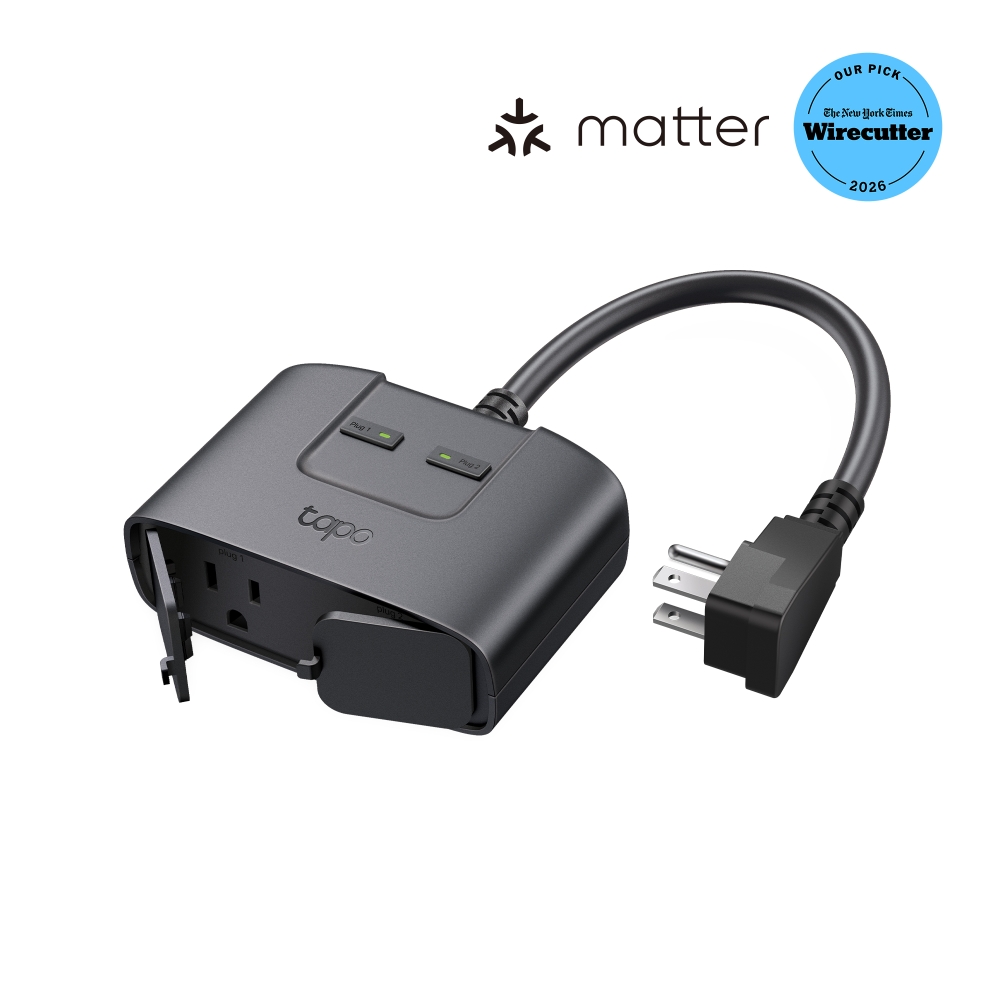
The P400M is a corded outdoor unit with two sockets that TP-Link says can be controlled individually. The selected US product route is a one-device package, not two independent smart plugs. Its current page describes the outlet as Matter-compatible and gives a 15 A / 1,800 W general-use or resistive ceiling, along with an 8 A incandescent limit. The V1.6-linked datasheet also states 1/6 hp for a motor. Those are different load cases: the 15 A resistive rating is not a motor rating, and the unit's two outlets do not each receive a separate 15 A allowance.
There is a meaningful version-source disagreement on motor capacity. The live product page currently says 1/2 hp, but the support-linked V1.6 datasheet says 1/6 hp; TP-Link's V1 selector and V1.60 default also make the exact edition at a seller an important bridge. For the finder and this assessment I use the lower, explicit 1/6 hp document value rather than treating the higher current-page claim as a confirmed allowance for every V1/V1.60 unit. If a motor load is important, check the exact device label and current instructions with TP-Link before relying on either figure. Do not use wattage alone to infer motor suitability.
Weather rating comes with a specific mounting routine
TP-Link rates the housing IP65 and gives an operating range of -4°F to 122°F. The linked quick-start guide says to mount it vertically with the receptacles facing down, keep it at least 12 inches above ground and use a GFCI-protected outlet outdoors. Unused sockets should be capped with the weather-resistant cover, and the guide says to keep the cover over the sockets when they are not in use. The included clamp, screw/wall anchor and guide point to a mounting job; the IP number does not make a poorly oriented, uncovered connection a fit.
TP-Link lists the body at 3.1 × 4.2 × 1.6 inches (H × W × D). Measure the receptacle, cover, nearby equipment and cord path separately. Its product page's long-range Wi-Fi figure is an open-area manufacturer claim, not a prediction of coverage through siding, masonry, distance or interference. The plug uses 2.4 GHz Wi-Fi; Bluetooth is for setup, not a second operating network.
Tapo routines and Matter are distinct control paths
TP-Link documents Tapo app schedules, countdown timers and Away Mode for the P400M. It also lists Matter-based smart-home control, including Apple Home and voice-platform routes; Matter commissioning requires a compatible controller and uses Bluetooth on the phone during setup. Multi-admin setup is described in the linked TP-Link Matter guidance, but features do not automatically carry across apps. The Matter platform-feature table lists platform-specific limitations, so plan to use Tapo for the P400M's documented routines unless your chosen controller's current feature support says otherwise. In particular, the checked P400M sources do not establish energy monitoring, so this is not a sound choice if energy data is essential.
This combination is most compelling when two outdoor loads need separate switching and the controlled equipment falls within the exact load limits. It is less suitable when a buyer needs energy reports, an assured motor rating above the conservative 1/6 hp document, a small straight-to-wall plug, or a seller whose revision cannot be verified. The photographs and specifications describe the manufacturer's unit; they are not a substitute for checking the packaging, electrical nameplate, installation requirements and platform app you will actually use.
Key specifications
Key details at a glance
| Controlled outlets | One corded plug with two individually controlled outlets |
|---|---|
| Reviewed package | 1-pack |
| Maximum current | 15 A |
| Maximum published watts at 120 V | 1800 W |
| Motor limit | Use the V1.6-linked datasheet value of 1/6 hp for conservative matching; the current P400M product page separately states 1/2 hp. The seller hardware suffix is not established, so check the device label and instructions. |
| Body height | 3.1 in |
| Body width | 4.2 in |
| Body depth | 1.6 in |
| Network and protocol | IEEE 802.11 b/g/n 2.4 GHz Wi-Fi; Bluetooth 4.2 is for setup only; third-party Matter commissioning requires a compatible controller. |
| Indoor use only | No |
| Outdoor rating | Yes |
| Schedules documented | Yes |
| Countdown timer / auto-off | Yes |
| Away Mode | Yes |
| Matter controller for third-party app | Yes |
Use the exact model’s instructions for operating limits, supplied equipment and version differences.
Sources for this review
Sources for this assessment
- TP-Link US smart-plug catalogue, page 1
- TP-Link US Tapo P400M V1 (1-pack) selected product route
- TP-Link US Tapo P400M family product page
- TP-Link US P400M support selector defaulting to V1.60
- TP-Link US P400M V1 support selector
- TP-Link US Tapo P400M V1.6-linked datasheet
- TP-Link US Tapo P400M V1.6-linked user guide
- TP-Link US Tapo P400M V1.6-linked quick installation guide
- TP-Link Matter platform feature guidance
- TP-Link Matter setup and controller guidance
- CPSC SaferProducts exact-name query for Tapo P400M
- Official TP-Link US Tapo P400M product image

Check the exact version against your own outlet
The finder checks documented ratings and features; it cannot approve your appliance, outlet wiring or physical clearance.