
Your needs, this model
Does it fit your priorities?
Does the four-pack give me four separately controlled outlets?
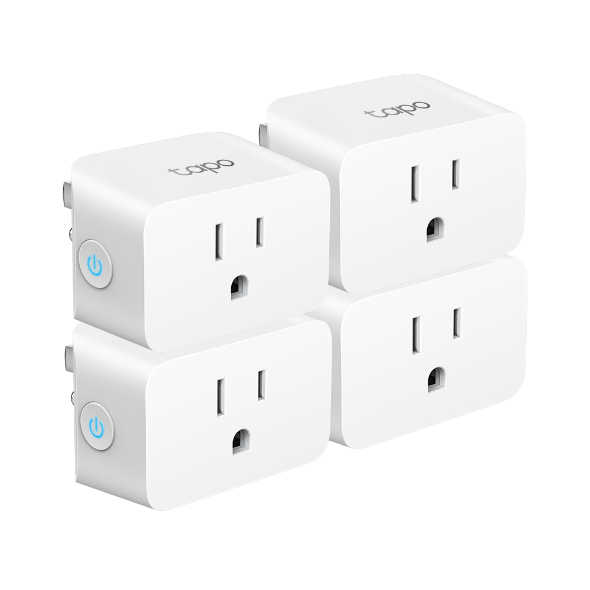
The package image and datasheet package table show four P125 plugs, each a separate one-outlet device with its own button and Wi-Fi connection. It is not one extender with four sockets, and each plug must be matched to its own appliance. TP-Link’s EOS list marks specific P125 V1.6/V1.8 revisions for replacement; check the exact hardware label.
Explore this need in the finder →Can I use the four-pack with Apple Home and still schedule through Tapo?
TP-Link documents HomeKit support and Tapo-app weekly schedules. The HomeKit card says an Apple home hub helps with remote access, sharing and automations; the Tapo schedule is a separate documented control path. Confirm which app and hub functions you intend to use.
Explore this need in the finder →Can I put the package outdoors or use four ratings for one motor?
No. TP-Link says not to use P125 in damp environments or outdoors. The 1/6 hp motor ceiling and 15 A general-use rating apply to each individual device; the four-package count does not combine them.
Explore this need in the finder →The Tapo P125 four-pack is a bundle of four individual indoor smart plugs. TP-Link's own package selector exposes the route separately from the two-pack, and its official package artwork shows four P125 plug bodies. This page evaluates that exact US four-unit configuration, not an outlet extender or a four-receptacle adapter. It is a source-based assessment rather than a hands-on review or electrical test.
Four locations, four separate one-outlet devices
A four-pack is useful only if you have four suitable places to use the plugs. Each P125 has one controlled receptacle, its own physical button and its own connection to a wall outlet. The four units are not linked by a common enclosure or a package-level power budget. TP-Link's datasheet lists four units in the 4 Pack column, while the US category product family and selected product route identify the package; the companion 2-pack is a separate route for people who need fewer plugs. This is a quantity choice, not a change in the plug's electrical capacity.
That distinction is easy to miss because TP-Link's general P125 page can display the four-pack as the selected offer even when reached through the family page. On the 4-pack route, the selected package label and package image both show four units. Verify the seller's exact package before checkout, especially when a listing uses a family photograph or groups several hardware versions together. The current manufacturer source set documents a 2-pack and a 4-pack route; it does not establish the contents of every marketplace offer.
TP-Link's Smart Home EOS list marks P125 four-pack versions 1.6 and 1.8 for replacement, with EOS dates in 2024. The catalog shows only V1, so check the exact unit label; a live family route does not establish current production or stock.
One rating applies to each connected load
For each P125, TP-Link lists a 100–125 V, 50/60 Hz supply, a maximum of 15 A and 1,800 W at 120 V for general/resistive loads, plus a separate 1/6 hp motor limit. The datasheet also lists an 8 A incandescent ceiling. Use the limit matching the actual load: a fan or pump's motor rating is not cleared simply because its running wattage is below 1,800 W. A four-pack does not create a shared 60 A rating, and it does not let one appliance draw from the unused capacity of the other three plugs.
Check each appliance's label and manual independently, including voltage, current and motor or compressor requirements. TP-Link's common load examples are guidance within the stated limits, not a blanket endorsement for every heater, kettle, refrigerator or pump. If the manual's requirements are ambiguous, seek a model-specific answer from the manufacturer rather than stretching a general-use rating.
HomeKit compatibility, not assumed Matter
TP-Link identifies P125 as HomeKit-enabled, with Apple Home and Siri support, and also lists Alexa and Google Assistant voice control. Its US specifications name 2.4 GHz Wi-Fi and Bluetooth 4.2 for onboarding only. The sources checked for P125 do not identify it as Matter-certified. In this library, the Apple Home preference means the ecosystem is supported; it does not assert that every product uses Matter. The adjacent P125M is a different Tapo model whose documented Matter support should not be imputed to P125.
Setup through Tapo uses the app and a TP-Link ID. For Apple Home, the guide uses the HomeKit code and recommends a stable 2.4 GHz connection. TP-Link's HomeKit card explains that an Apple home hub such as HomePod or Apple TV helps with remote access, sharing and automations. Confirm whether you already have the required hub for those specific functions, and whether you want to manage these four devices in both Tapo and Apple Home. The two ecosystems' names are not substitutes for checking the model's protocol and setup instructions.
Routines and the limits of “local” control
TP-Link documents weekly schedules, countdown timers, enhanced Auto-Off and Away Mode for P125. The manufacturer also says its configured app can control connected devices when internet access is down and that schedules continue. These are practical features for routines across several lamps or other approved appliances. They do not mean that all cloud voice assistants, remote control from outside the home or third-party automations will continue through an outage. The plug still needs power and a working local Wi-Fi network, and a router replacement or account change can require setup work.
Energy-use reporting is not listed in the checked P125 specifications, so buyers who need measured consumption should not rely on this model for it. TP-Link's datasheet warns against damp or outdoor use. Four units do not make the P125 weather-resistant, and indoor plugs should not be repurposed for garden lights or exposed outlets.
Fit, setup and a better way to use the bundle
Each plug is listed at 2.4 inches high by 1.5 inches wide by 1.3 inches deep. The manufacturer's page calls the body compact, but a package image and dimensions cannot show how four different wall plates, neighboring receptacles, cords and furniture will interact in your home. Measure every intended location; identical plug bodies can fit one outlet and crowd another. Keep ventilation clear and do not place the devices in enclosed or hot spots contrary to the manual.
The four-pack makes sense if your plan already covers several indoor locations, the connected loads fit the individual ratings, and you want Tapo routines with optional Apple HomeKit control. It is not the right shortcut when you need one plug, a multi-outlet strip, an outdoor-rated device, verified energy monitoring or Matter as a non-negotiable protocol. Choose by the number of locations, then verify the exact model, package, version and appliance instructions. No current price, seller stock or product performance has been independently verified here.
Primary references: TP-Link's US P125 4-pack route, 2-pack selector route, P125 support and version page, US datasheet, user guide and HomeKit setup card (checked 2026-10-28).
Key specifications
Key details at a glance
| Controlled outlets | One controlled outlet per plug |
|---|---|
| Reviewed package | 4-pack |
| Maximum current | 15 A |
| Maximum published watts at 120 V | 1800 W |
| Motor limit | 1/6 hp |
| Body height | 2.4 in |
| Body width | 1.5 in |
| Body depth | 1.3 in |
| Network and protocol | 2.4 GHz 802.11b/g/n Wi-Fi; Bluetooth 4.2 is for onboarding only; Apple HomeKit is documented, not Matter certification. |
| Indoor use only | Yes |
| Outdoor rating | No |
| Schedules documented | Yes |
| Countdown timer / auto-off | Yes |
| Away Mode | Yes |
Use the exact model’s instructions for operating limits, supplied equipment and version differences.
Sources for this review
Sources for this assessment
- TP-Link US Smart Plugs catalog, page 2
- TP-Link Tapo P125 US V1 2-pack route
- TP-Link Tapo P125 US V1 4-pack route
- TP-Link Tapo P125 US product-family page and package selector
- TP-Link Tapo P125 US support and hardware-version page
- TP-Link Tapo P125 US datasheet
- TP-Link Tapo P125 user guide
- TP-Link HomeKit setup card
- CPSC SaferProducts recall API, Tapo P125 product-name screening
- TP-Link Smart Home EOS list (October 2024 PDF)
Check the exact version against your own outlet
The finder checks documented ratings and features; it cannot approve your appliance, outlet wiring or physical clearance.