
Your needs, this model
Does it fit your priorities?
Does Apple Home compatibility here mean Matter?
No Matter certification was found in the checked P125 records. TP-Link describes this model as HomeKit-enabled; its HomeKit setup card says an Apple home hub helps with remote access, sharing and automations. Choose another exact model if Matter itself is essential. TP-Link’s EOS list marks specific P125 V1.6/V1.8 revisions for replacement; check the exact hardware label.
Explore this need in the finder →Can the two plugs run separate scheduled appliances?
The US package contains two individual P125 plugs, each with one controlled outlet. TP-Link documents weekly schedules, countdown timing and Away Mode in the Tapo app. Check each appliance against its own 15 A / 1,800 W general-use and 1/6 hp motor limits.
Explore this need in the finder →Will the P125 report how much energy both appliances use?
The checked P125 product page and datasheet do not document energy-use monitoring. The matcher treats that requirement as unconfirmed; do not select this package for consumption reporting without another exact-model source. TP-Link’s EOS list marks specific P125 V1.6/V1.8 revisions for replacement; check the exact hardware label.
Explore this need in the finder →The US Tapo P125 is a HomeKit-enabled Wi-Fi plug, not the Matter-marked P125M. TP-Link's US catalog identifies the P125 listing with a two-unit image, and its package selector separately offers a four-pack route. This assessment is for the two-plug package. It is document-based; I have not used or electrically tested either plug.
Know what the two-pack contains
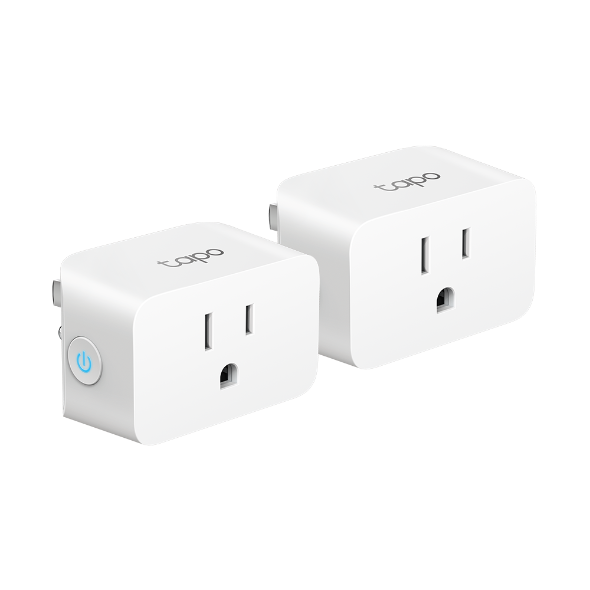
The manufacturer's datasheet lists two Tapo P125 units in its 2 Pack column. Each is a direct plug-in device with one controlled outlet, a side power button and a body shared with other P125 package sizes. This is two separate plugs, not a dual-outlet adapter or power strip. The same datasheet lists a four-pack, while the US category row is tied to catalog item 61169 and displays the two-unit package image. A package's item count changes how many plugs arrive, not the safe rating of an individual plug.
Before buying, check the exact offer title and image. TP-Link's main P125 page can open with the 4-pack selector active, so a bare family URL does not always tell you which package an offer represents. The route selector and package-specific image are clearer evidence than a shared family name. Do not assume an older or third-party listing's contents from the model number alone.
TP-Link's Smart Home EOS list records P125 2-pack versions 1.6 and 1.8 as “Contact us for a replacement,” with EOS dates in 2024. The catalog route says only V1, so check the exact hardware label; the current product page is not proof of current production or stock.
Read the appliance label against the right limit
TP-Link specifies 100–125 V, 50/60 Hz, up to 15 A and 1,800 W at 120 V for general or resistive use. Its datasheet separately lists 8 A for incandescent loads and a 1/6 hp motor limit. Those numbers answer different questions: the 15 A resistive ceiling does not authorize every motor, compressor or specialty appliance. Check the appliance nameplate and instructions, including its voltage, running current, wattage and motor or starting-current information. When those details are missing or the load is outside the listed class, treat fit as unconfirmed rather than assuming the plug's top-line watt figure settles it.
The two-unit pack does not allow two appliances to share one plug rating, and its ratings should not be added together as if they created a single 30 A outlet. Each P125 controls one connected appliance at one receptacle. This is a poor choice for a load that needs a dedicated hardwired control, a multi-outlet strip, or a rating that is not documented for the exact equipment.
HomeKit is the important distinction from P125M
TP-Link describes P125 as Apple HomeKit compatible and lists Alexa and Google Assistant voice control. The checked P125 materials identify Wi-Fi at 2.4 GHz and Bluetooth 4.2 for onboarding only. They do not identify this model as Matter-certified. That matters if you are comparing it with the separate Tapo P125M: Apple's Home app compatibility is a shared ecosystem outcome, not proof that the underlying setup protocol is the same. If you require Matter specifically, do not infer it from the Apple Home label; the product record and packaging need to name Matter for the exact model.
The Tapo app setup path requires a Tapo account, and the user guide says to use a stable 2.4 GHz Wi-Fi connection. The HomeKit path uses the QR code on the plug or label and recommends current iOS or iPadOS. TP-Link's HomeKit setup card explains that an Apple home hub such as HomePod or Apple TV supports remote control, sharing and automations. A hub is not the same as a prerequisite for the plug's basic Tapo setup; confirm the home-hub requirement for the particular remote or automation job you expect. Bluetooth is for setup, not a second operating network.
Schedules, timers and internet-loss expectations
TP-Link documents weekly schedules, countdown plans, Auto-Off and Away Mode in its P125 product material. It also says the configured app can control devices and schedules continue during an internet outage. That is useful for a lamp or other suitable load on a regular routine, but it is not a promise that a voice assistant's cloud service, out-of-home access or every third-party automation will still be reachable. Test the intended routine after setup and after a router or account change; do not treat a marketing feature list as a guarantee of uninterrupted service.
The checked product and datasheet pages do not list energy-use monitoring. If measuring consumption is essential, this P125 assessment cannot confirm it. It is also an indoor device: the datasheet says not to use it outdoors or in damp environments. A covered porch is still an exposure question, not a way to convert an indoor-only plug into a weather-rated one.
Who should consider this package
The two-pack is a plausible documented fit when you need two separate indoor single-outlet controls, prefer the Tapo app's schedule and timer tools, and want Apple HomeKit compatibility without selecting a Matter-only product. It is less compelling if one plug is all you need, if you need outdoor protection, if you need verified energy data, or if your home requires a specific protocol that the P125 documentation does not name. The four-pack route is the quantity alternative; the P125M is a different model with Matter features, not a hidden revision of this one.
Measure the actual receptacle area before ordering. The body is listed as 2.4 inches high, 1.5 inches wide and 1.3 inches deep, but those figures do not include a faceplate, the next outlet, cord bend, furniture or a bulky adapter. Check seller, exact US model, package count, version label, return conditions and your appliance manual at the point of purchase; this review makes no price, stock or availability claim.
Primary references: TP-Link's US P125 2-pack route, P125 support and version page, US datasheet, user guide and HomeKit setup card (checked 2026-10-28).
Key specifications
Key details at a glance
| Controlled outlets | One controlled outlet per plug |
|---|---|
| Reviewed package | 2-pack |
| Maximum current | 15 A |
| Maximum published watts at 120 V | 1800 W |
| Motor limit | 1/6 hp |
| Body height | 2.4 in |
| Body width | 1.5 in |
| Body depth | 1.3 in |
| Network and protocol | 2.4 GHz 802.11b/g/n Wi-Fi; Bluetooth 4.2 is for onboarding only; Apple HomeKit is documented, not Matter certification. |
| Indoor use only | Yes |
| Outdoor rating | No |
| Schedules documented | Yes |
| Countdown timer / auto-off | Yes |
| Away Mode | Yes |
Use the exact model’s instructions for operating limits, supplied equipment and version differences.
Sources for this review
Sources for this assessment
- TP-Link US Smart Plugs catalog, page 2
- TP-Link Tapo P125 US V1 2-pack route
- TP-Link Tapo P125 US V1 4-pack route
- TP-Link Tapo P125 US product-family page and package selector
- TP-Link Tapo P125 US support and hardware-version page
- TP-Link Tapo P125 US datasheet
- TP-Link Tapo P125 user guide
- TP-Link HomeKit setup card
- CPSC SaferProducts recall API, Tapo P125 product-name screening
- TP-Link Smart Home EOS list (October 2024 PDF)
Check the exact version against your own outlet
The finder checks documented ratings and features; it cannot approve your appliance, outlet wiring or physical clearance.