
Your needs, this model
Does it fit your priorities?
Can I use EP25P2 with Apple Home and a schedule?
The EP25P2 V2.6 user guide documents adding the HomeKit plug to Apple Home, and TP-Link documents Kasa schedules. HomeKit needs its own setup code; check the Apple home hub requirement for remote control, sharing or automations.
Explore this need in the finder →Will the energy report appear in Apple Home?
No: TP-Link's EP25 datasheet says energy monitoring is not supported in the HomeKit app. The documented energy view is in Kasa Smart. Choose this model only if the Kasa route meets your reporting need.
Explore this need in the finder →Does its published 1,800 W limit establish a motor rating?
No separate motor-horsepower ceiling is listed in the checked EP25P2 V2.6 sources. The manufacturer guide lists example appliance watt limits, but an unknown motor rating does not satisfy an essential motor requirement.
Explore this need in the finder →How many controlled outlets come in the package?
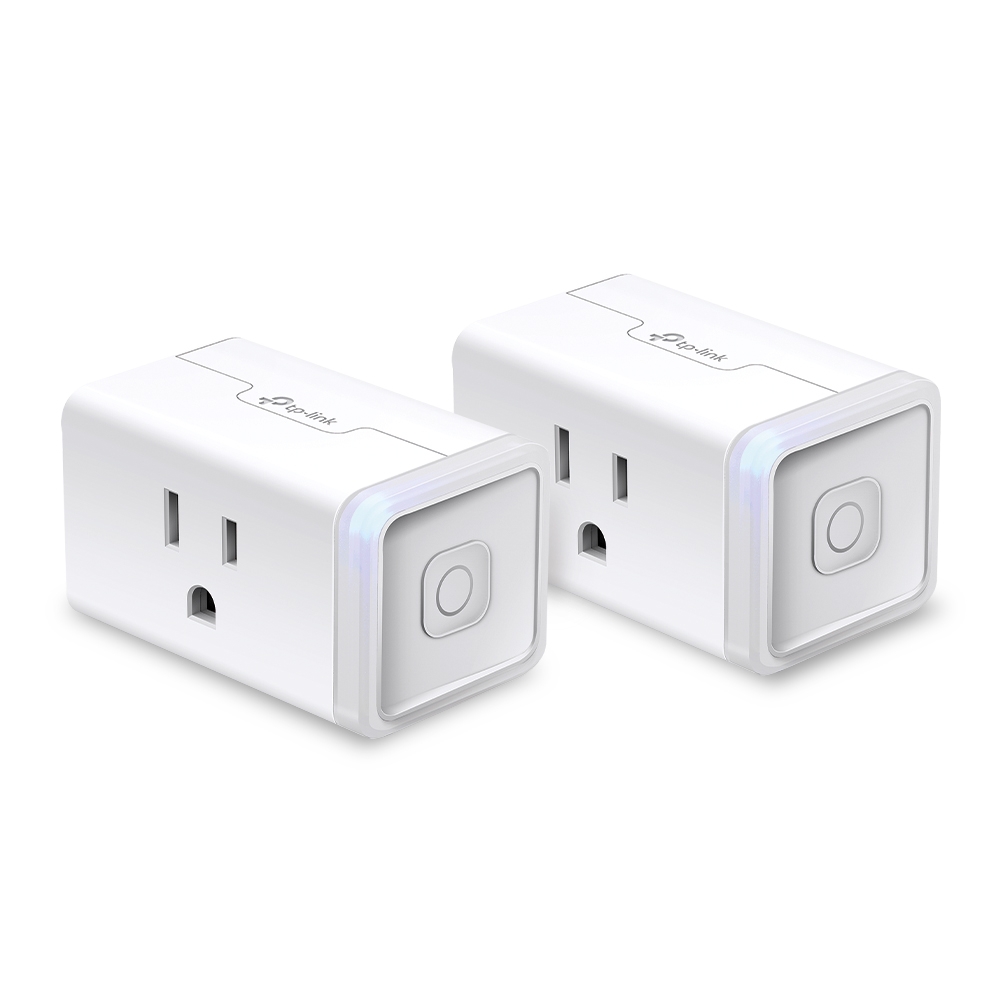
The official product image depicts two EP25 plugs, and the V2.6 guide is for the EP25P2 two-pack. Each plug controls one receptacle; package count does not make a two-outlet adapter.
Explore this need in the finder →Research-based assessment of the US Kasa EP25P2 V2.6 two-pack. I have not used or tested this product; this review interprets TP-Link's exact product page, versioned downloads, datasheet and user guide.
Two smart plugs, not a two-outlet adapter
EP25P2 is TP-Link's Kasa slim-plug two-pack. The package image and V2.6 support downloads identify two separate plugs; each body controls one receptacle. That gives a buyer two switching points, not one device with two independently controlled sockets. Ratings apply to each plug and appliance connection individually. Confirm that a seller is offering the US V2.6 EP25P2 package rather than another EP25 family listing or a single plug.
The family resemblance can be misleading: TP-Link sells other EP25 variants, including an earlier EP25P4 route. The number in the model and package configuration matter. This review does not transfer the EP25P4's published motor-horsepower ceiling to EP25P2 V2.6 merely because both use the EP25 name.
HomeKit plus Kasa, with a deliberate app distinction
The V2.6 product and support pages document 2.4 GHz 802.11 b/g/n Wi-Fi, Kasa Smart control, Apple HomeKit and listed voice integrations including Alexa, Google Assistant and SmartThings. TP-Link's HomeKit guide shows adding the device to Apple Home with its code. It also notes that an Apple home hub such as a HomePod, HomePod mini or Apple TV helps with remote access, sharing and automations. Check the exact Apple setup requirement for the use you want; local on/off control and remote Home access are not the same question.
The smart plug's energy monitoring is a meaningful extra, but the app route matters. TP-Link states that energy monitoring is available in Kasa Smart and is not supported in Apple's Home app. If your household wants usage history, you need to use the Kasa energy view rather than expecting a consumption chart in HomeKit. The checked V2.6 sources do not document Matter or Thread, so Apple Home support should be described as HomeKit—not used as evidence of Matter certification.
Schedules, a countdown or auto-off timer and Away Mode are documented in the Kasa route. Away Mode randomizes switching to simulate occupancy; it is not a security system and should not be treated as one. The sources do not establish whether already-configured control continues during internet loss, so I leave that behavior unknown rather than extrapolating from an app's remote-control feature.
What the 1,800 W number does—and does not—say
TP-Link's V2.6 EP25 materials list a 100–120 V input/output range and a maximum load of 1,800 W. They do not state a maximum current in amps or a motor-horsepower limit for this exact configuration. The product page suggests lamps and small appliances, but a watt ceiling alone is not an all-load approval. Check the appliance nameplate and manual, especially for a compressor, motor or equipment with a specialized switching requirement.
For comparison, the EP10 page explicitly separates a 15 A / 1,800 W general-use resistive rating, and the EP25P4 route publishes a motor limit. Those numbers are not interchangeable with EP25P2's V2.6 record. The finder can compare this plug against a stated wattage requirement, but it will not treat an unknown amp or motor rating as satisfying an essential condition.
TP-Link specifies indoor use only. The product dimensions are 66.5 × 38 × 40 mm (2.6 × 1.5 × 1.6 inches, H × W × D), and its materials describe a compact body intended to leave adjacent sockets accessible. That claim does not account for every wall plate, outlet spacing, other plug body or appliance cord. Measure both locations where the pair will be used; a fit at one receptacle does not prove that the second installation clears.
Where the two-pack fits in this library
EP25P2 V2.6 is the most direct Kasa fit here when a buyer wants two indoor switching points, HomeKit support and energy reporting in the Kasa app. EP10 has a more explicit general-resistive load statement and an unknown package count on its catalog route, but its checked documents do not establish energy monitoring or Apple Home. EP25P4 supplies four separate plugs and lists a separate motor limit, but the observed V1 route is earlier and its exact seller revision needs attention. Tapo P125 is a HomeKit model; P125M is a different Matter model. These distinctions explain why “works with Apple Home” is not a complete compatibility specification.
Choose another option if outdoor use, a known motor ceiling, a documented amp rating, a Matter requirement or reliable operation after an internet outage is essential. This record is intentionally conservative about those missing fields. Two devices increase the package's outlet count, not the per-device current or wattage limit.
Before buying
Match the package label to EP25P2 V2.6 and verify that two plug bodies are included. Compare the intended appliance's voltage and marked wattage with the manufacturer's limits, then check its instructions for motor, compressor or safety restrictions. Decide whether the Kasa app's energy screen is acceptable if monitoring matters. For Apple Home remote control, shared access or automations, verify the hub arrangement in the actual home. Finally, measure both wall outlets, surrounding faceplates and cord paths.
This assessment does not report measured energy accuracy, switching endurance, temperature, wireless reach, app reliability, live stock or current price. TP-Link's product specifications and instructions describe intended features, not a guarantee that a local network, Apple home or specific appliance will behave identically in every installation.
Bottom line
The EP25P2 V2.6 two-pack combines two one-outlet indoor plugs, HomeKit support, Kasa energy reporting and scheduled control. Its trade-offs are the app split for energy monitoring and an incomplete electrical record for some buyers: the exact V2.6 materials do not give an amp or motor rating. Read TP-Link's EP25P2 product page, versioned support downloads and HomeKit setup guidance before choosing a seller.
Key specifications
Key details at a glance
| Controlled outlets | One controlled outlet per plug |
|---|---|
| Reviewed package | US EP25P2 V2.6 two-pack; two separate one-outlet plugs. |
| Maximum published watts at 120 V | 1800 W |
| Body height | 2.6 in |
| Body width | 1.5 in |
| Body depth | 1.6 in |
| Network and protocol | 2.4 GHz 802.11 b/g/n Wi-Fi; Kasa Smart app and Apple HomeKit are documented. The checked EP25P2 materials do not establish Matter or Thread. |
| Indoor use only | Yes |
| Outdoor rating | No |
| Schedules documented | Yes |
| Countdown timer / auto-off | Yes |
| Away Mode | Yes |
Use the exact model’s instructions for operating limits, supplied equipment and version differences.
Sources for this review
Sources for this assessment
- TP-Link US Smart Plugs catalog, page 1
- Kasa EP25P2 V2.6 US product page
- EP25P2 US support downloads and versioned manuals
- EP25 V2.6 datasheet linked from EP25P2 support
- EP25P2 US V2.6 user guide
- EP25P2 US V2.6 quick installation guide
- TP-Link HomeKit device compatibility and setup FAQ
- CPSC SaferProducts recall API query for EP25P2, retrieved 2026-10-29
- TP-Link HomeKit setup card linked from EP25 support
Check the exact version against your own outlet
The finder checks documented ratings and features; it cannot approve your appliance, outlet wiring or physical clearance.